Domains and hosting confuse a lot of people, mostly because they’re often bought together, but they’re two different things.
The short version
- Your domain is your address. For example, mjjcreative.com.
- Your hosting is where your website’s files live, on a server that’s always on.
The domain is how people find your site, and the hosting is what loads when they get there.
Domains
You rent a domain by the year from a company called a registrar. As long as you renew it, it’s yours to use.
A few things worth knowing:
- If you let it expire, you can lose it. Someone else can register it, and getting it back can be hard or expensive.
- The domain also runs your email if your email address ends in your domain. Changes to the domain settings can affect email, so they need care.
- Know where it’s registered and who has the login. Not knowing is one of the most common problems we see.
We register and renew your domain for you, on a service that also puts your site on a fast network around the world and adds protection against attacks.
Hosting
Hosting is a computer that stores your website and sends it to every visitor. Good hosting is fast, secure and backed up.
Cheap shared hosting puts many sites on one server, so a busy or hacked neighbour can slow yours down. Better hosting keeps each site isolated.
Our sites run on managed hosting, with every site kept separate from the others. Security is on from day one:
- HTTPS, with certificates that renew themselves
- A web application firewall
- Brute-force and DDoS protection
- Automatic backups
- Uptime monitoring
How they work together
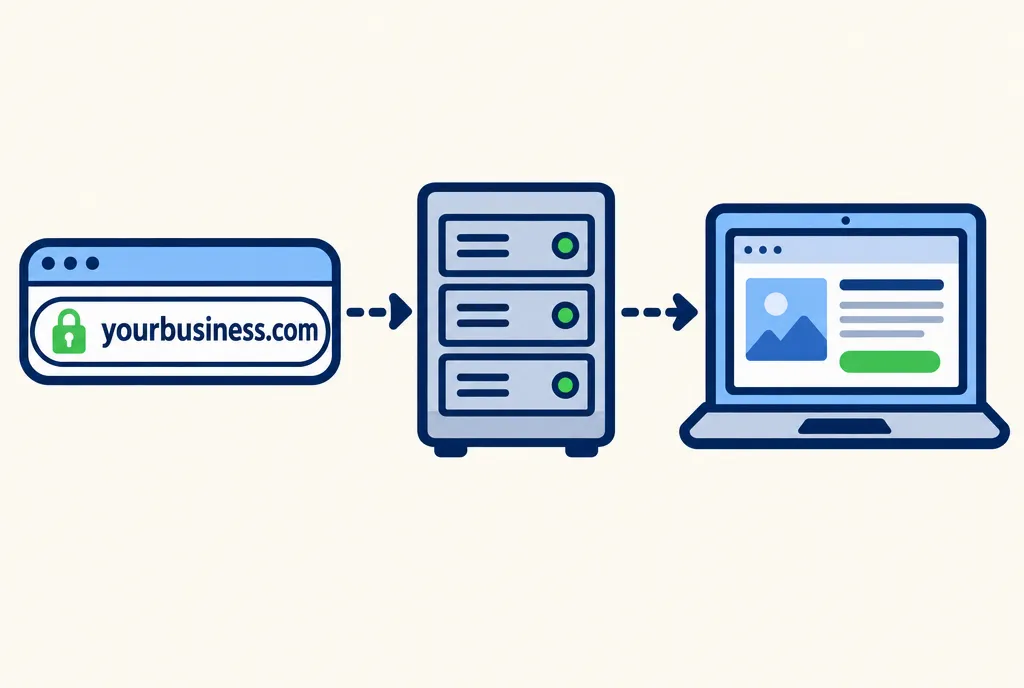
When someone types your address, the domain’s settings (called DNS) point their browser to your hosting. The hosting sends back your site. That takes a fraction of a second.
Switching to a new host
Moving a site is routine, but a few things need checking first:
- Who has access to the domain
- Whether your email runs on the domain, so it keeps working
- That a backup of the old site exists before anything changes
Who looks after it
When we build your site, we set up and look after the hosting and your domain for you. If you’d like to know exactly where everything is, ask and we’ll walk you through it.